Opt-In List Manager: Separate List
 By using this tool you can separate e-mail addresses from the input file by domain
and sort/de-dup the output file or randomize it within each domain. Also you can
randomize the whole input file.
By using this tool you can separate e-mail addresses from the input file by domain
and sort/de-dup the output file or randomize it within each domain. Also you can
randomize the whole input file.
Select File To Separate Addresses From, Output File and possibly Output Directory (if you choose Create Separate Files For Each Country Code or Create Separate Files For Each Of These Domains).
Select one of the available modes:
- Separate By Domain/Sort. Output file(s) will contain e-mail addresses of like domains grouped together. E-mails within each domain will be sorted alphabetically. Additionally you can tell OILM to remove duplicates by putting check mark in the De-Dup Output File(s) box.
- Separate By Domain/Randomize. Output file(s) will contain e-mail addresses of like domains grouped together. E-mails within each domain will be in random order. If you specify domains for which will be created separate files, you can tell OILM to randomize the Misc. File too (option Randomize Misc. Too ).
- Randomize Whole File. Output file will contain all lines from the input files in random order.
Click Result File(s) button to see the files produced by the tool.
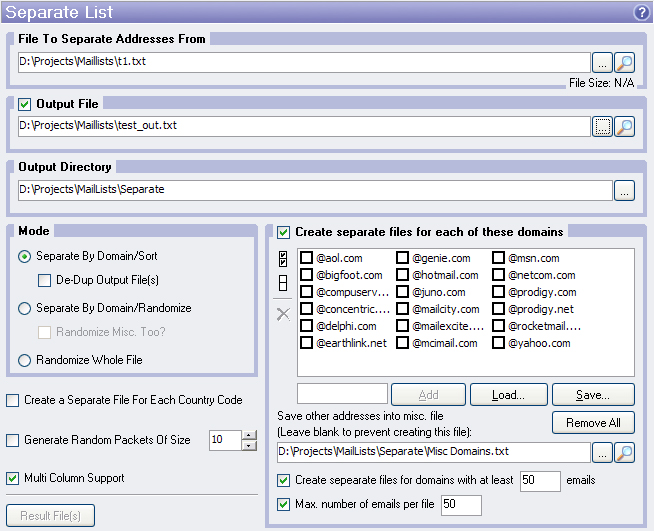
Create Separate Files For Each Of These Domains
This option available if you select Separate By Domain/Sort or Separate By Domain/Randomize mode. Check this and then select domains, which you wish to have separate files created for. Domain names must begin with '@' symbol. OILM will create separate files named <domain name>.txt for each these domains in Output Directory. Also you can specify Misc. File in which will be stored e-mail addresses of other domains. There are two additional options:
- Create separate files for domains with at least X emails. List manager makes a separate text file for each domain having X emails or more.
- Max. number of emails per file allows you split large output files into parts with a specified number of lines or less.
Create Separate Files For Each Country Code
This option available if you select Separate By Domain/Sort or Separate By Domain/Randomize mode. Checking this will separate your e-mails by country code suffix. OILM will create separate files named <country code>.txt for each country code in Output Directory. For example, e-mails "userA@aol.com", "userB@yahoo.com" will be placed in the file "com.txt".
Generate Random Packets Of Size
This option available if you select Separate By Domain/Sort or Separate By Domain/Randomize mode. When this option is checked then after separating your e-mail addresses by domain OILM will divide them up into packets of specified size and then re-arrange these packets randomly.
Multi Column Support
This option allows you to process multicolumn e-mail lists. See What is Multi Column Support for details. This option available if you select Separate By Domain/Sort or Separate By Domain/Randomize mode.